- 8920675323
- 9971118455
- Uttar Pradesh, India

Power BI Pro vs Premium: Which Microsoft BI Solution Is Right for Your Business?

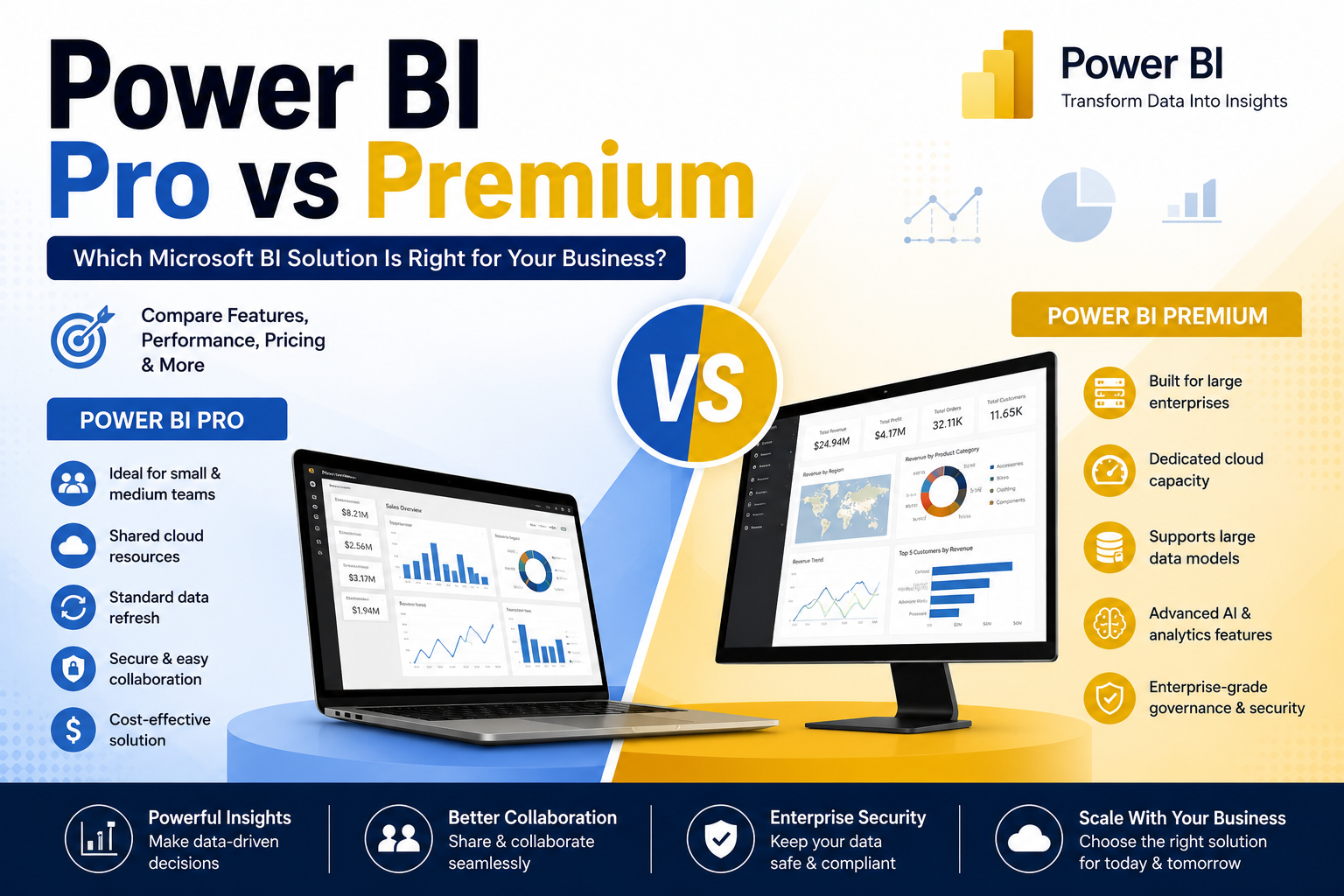
In today’s data-driven business landscape, organizations need more than spreadsheets—they need actionable insights. Microsoft Power BI has become one of the world’s most popular business intelligence (BI) platforms, helping companies transform raw data into meaningful dashboards and reports.
However, one common question businesses ask is:
Should you choose Power BI Pro or Power BI Premium?
While both editions provide powerful analytics capabilities, they are designed for different business needs. In this guide, we’ll compare Power BI Pro and Power BI Premium to help you make the right decision.
What is Power BI Pro?
Power BI Pro is Microsoft’s standard business intelligence license designed for professionals, teams, and small to medium-sized businesses.
It allows users to:
- Create interactive reports and dashboards
- Connect to hundreds of data sources
- Share reports with colleagues
- Collaborate through Microsoft Teams and Microsoft 365
- Schedule automatic data refreshes
- Publish reports securely
Power BI Pro is ideal for organizations where every user actively creates or consumes reports.
What is Power BI Premium?
Power BI Premium is designed for enterprises that require advanced analytics, larger datasets, enhanced performance, and broader report distribution.
Unlike Power BI Pro, Premium provides dedicated cloud capacity, allowing organizations to share reports with many users without requiring every viewer to have a Pro license (depending on licensing model).
Premium includes enterprise-grade features such as:
- Larger dataset capacity
- Higher refresh frequency
- AI-powered analytics
- Paginated reports
- Advanced governance
- Better performance for large organizations
Power BI Pro vs Premium Comparison
| Feature | Power BI Pro | Power BI Premium |
|---|---|---|
| Best For | Small & Medium Businesses | Large Enterprises |
| Report Creation | ✔ | ✔ |
| Dashboard Sharing | ✔ | ✔ |
| Collaboration | ✔ | ✔ |
| Dedicated Capacity | ✖ | ✔ |
| Large Data Models | Limited | Extensive |
| AI Features | Basic | Advanced |
| Paginated Reports | Limited | ✔ |
| Performance | Shared Resources | Dedicated Resources |
| Enterprise Deployment | Basic | Advanced |
Performance Comparison
Power BI Pro
Since Power BI Pro uses shared Microsoft cloud resources, performance is excellent for most businesses but can slow during heavy workloads.
Ideal for:
- Sales reporting
- Marketing dashboards
- Financial reports
- HR analytics
- Inventory management
Power BI Premium
Premium offers dedicated cloud capacity, meaning your organization’s analytics workloads aren’t affected by other tenants.
Benefits include:
- Faster dashboard loading
- Better report performance
- Larger concurrent users
- Better scalability
- Reduced latency
This makes Premium suitable for enterprise-wide deployments.
Collaboration Features
Both versions support collaboration through Microsoft 365.
With either plan, teams can:
- Share dashboards
- Comment on reports
- Export reports
- Integrate with Microsoft Teams
- Embed reports in SharePoint
However, Premium makes enterprise-wide sharing much easier for organizations with hundreds or thousands of report consumers.
AI and Advanced Analytics
Power BI Premium includes several advanced AI capabilities unavailable or limited in Pro.
Examples include:
- AI-assisted insights
- Machine learning integration
- Natural language querying
- Cognitive Services integration
- Automated anomaly detection
These features are valuable for organizations performing predictive analytics or large-scale business intelligence.
Data Capacity
One of the biggest differences lies in dataset size.
Power BI Pro
Suitable for:
- Department reports
- Operational dashboards
- Moderate-sized datasets
Power BI Premium
Supports:
- Enterprise data warehouses
- Large-scale analytics
- Massive datasets
- Complex business models
Security Features
Both editions provide Microsoft’s enterprise-grade security.
Security capabilities include:
- Row-Level Security (RLS)
- Azure Active Directory authentication
- Microsoft Entra ID integration
- Data encryption
- Compliance certifications
- Secure report sharing
Premium adds additional governance and administrative capabilities for enterprise environments.
Which Businesses Should Choose Power BI Pro?
Power BI Pro is a great choice if your organization:
- Has fewer than 300 employees
- Needs collaborative reporting
- Uses Microsoft 365
- Doesn’t process extremely large datasets
- Wants affordable business intelligence
- Needs self-service analytics
Examples:
- Startups
- Retail businesses
- Marketing agencies
- Accounting firms
- Educational institutions
Who Should Choose Power BI Premium?
Power BI Premium is recommended for organizations that:
- Have hundreds or thousands of users
- Need enterprise-wide reporting
- Process very large datasets
- Require AI-powered analytics
- Need higher performance
- Require dedicated cloud capacity
Examples:
- Large corporations
- Manufacturing companies
- Healthcare organizations
- Financial institutions
- Government agencies
- Global enterprises
Power BI Pro vs Premium: Pros and Cons
Power BI Pro
Pros
- Cost-effective
- Easy collaboration
- Fast deployment
- Excellent Microsoft 365 integration
- Ideal for growing businesses
Cons
- Shared cloud capacity
- Smaller dataset limits
- Limited enterprise features
Power BI Premium
Pros
- Dedicated capacity
- Enterprise performance
- Advanced AI capabilities
- Large datasets
- Better scalability
- Enhanced governance
Cons
- Higher cost
- More suitable for larger organizations
- Advanced features may be unnecessary for small teams
Final Verdict
Both Power BI Pro and Power BI Premium are powerful business intelligence solutions, but the right choice depends on your organization’s size, reporting requirements, and growth plans.
Choose Power BI Pro if you need an affordable, collaborative analytics platform for a small or medium-sized business.
Choose Power BI Premium if your organization requires enterprise-scale reporting, advanced AI capabilities, dedicated performance, and support for large numbers of users.
As your business grows, you can always start with Power BI Pro and upgrade to Premium when your reporting and analytics needs expand.