- 8920675323
- 9971118455
- Uttar Pradesh, India

SQL Server Core vs Server + CAL Licensing: Which Is Right for Your Business?

Microsoft SQL Server is one of the most widely used database platforms for business applications, ERP systems, websites, analytics platforms, and enterprise workloads. But choosing the right SQL Server licensing model can be just as important as choosing the right edition.
For organizations evaluating SQL Server, one of the most common questions is:
Should we license SQL Server by Core or use Server + CAL licensing?
The answer depends on your number of users, workload type, server configuration, virtualization strategy, and whether users or devices can be reliably identified.
In this guide, we’ll explain SQL Server Core vs Server + CAL licensing, the major differences between the two models, and when each option makes sense.
Note: Microsoft licensing terms can vary by version, edition, agreement, and deployment model. This article is an educational overview, not a substitute for Microsoft’s Product Terms or a formal licensing assessment.
What Is SQL Server Core Licensing?
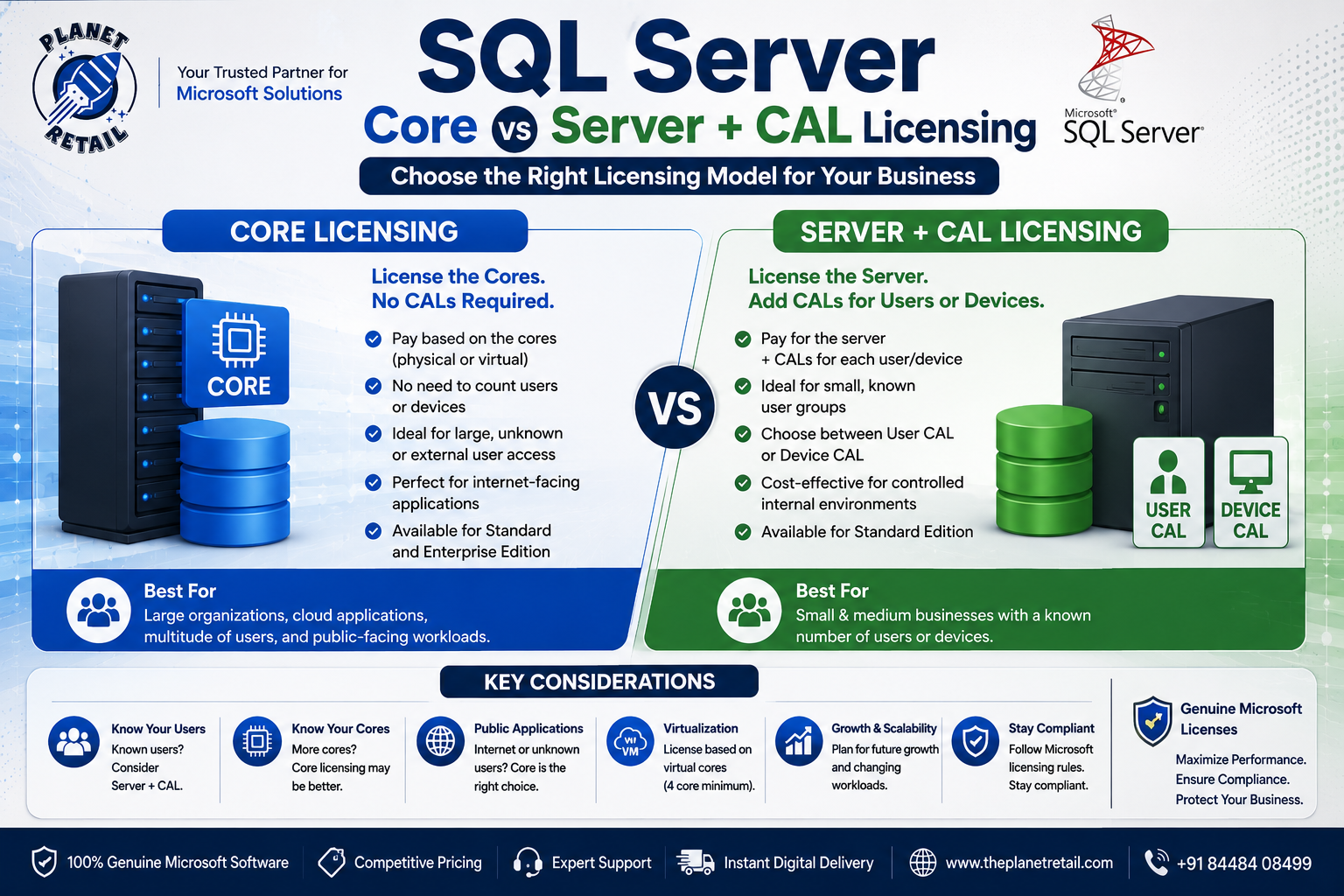
Under the Per Core model, you license the computing capacity running SQL Server rather than purchasing a CAL for every user or device.
For SQL Server 2025, Microsoft states that Per Core licensing is available for both Enterprise and Standard editions. With this model, users and devices accessing SQL Server do not require separate SQL Server CALs.
This makes Core licensing particularly useful when:
- You have many users
- Users are difficult to count
- Customers access your application
- You operate public-facing applications
- SQL Server supports an internet or extranet workload
- Multiple applications or systems connect to SQL Server
- You need enterprise-scale database infrastructure
How Core Licensing Works
When licensing a physical server by cores, you generally license the physical cores on the server, subject to Microsoft’s minimum requirements.
For SQL Server, Microsoft specifies a minimum of four core licenses per physical processor when licensing by physical cores. Core licenses are sold in two-core packs.
For eligible virtual-machine licensing, the number of licenses is based on the virtual cores assigned to the VM, subject to a four-core minimum per VM. Microsoft notes that Software Assurance or a subscription license is required for licensing by individual VM under the current guidance.
What Is SQL Server Server + CAL Licensing?
The Server + CAL model takes a different approach.
Instead of licensing the server’s computing capacity, you purchase:
- A SQL Server server license, and
- A SQL Server CAL for every user or device that accesses SQL Server
For SQL Server 2025, Microsoft states that Server + CAL licensing is available only for Standard Edition.
For example, imagine a company has:
- 1 SQL Server Standard server
- 20 employees accessing the database
The organization would generally need:
1 Server license + 20 User CALs
Alternatively, if the organization licenses by device, it could use Device CALs for the applicable devices.
SQL Server Core vs Server + CAL: Quick Comparison
| Feature | SQL Server Core | Server + CAL |
|---|---|---|
| Licensing metric | Server/VM cores | Server + users/devices |
| CALs required | ❌ No | ✅ Yes |
| Enterprise Edition | ✅ | ❌ New Server+CAL licenses unavailable |
| Standard Edition | ✅ | ✅ |
| Best for | Large/unknown user populations | Known users/devices |
| Public-facing applications | ✅ Strong fit | Usually unsuitable |
| Internet workloads | ✅ | Generally not appropriate |
| User/device counting | Not required | Required |
| Indirect access | Covered without separate CALs | CAL requirements still apply |
| Scalability | Excellent | Best with controlled user/device counts |
| Virtualization | Available under applicable terms | Available under applicable terms |
| Cost model | Based primarily on cores | Server + CAL count |
The Biggest Difference: How You Count Licenses
The fundamental difference is simple:
Core Licensing
Count the cores.
Server + CAL
Count the server + users/devices.
This distinction can have a major impact on total licensing costs.
Example 1: Small Internal Business
Suppose a company has:
- 1 SQL Server
- 8 physical cores
- 15 employees
- All users are known
- Internal business application
A Server + CAL model may be worth evaluating because the organization can clearly identify its users.
Instead of licensing every core for SQL Server, the company purchases the required server license and CALs.
Potential advantage: The organization has a predictable and limited user population.
Example 2: Large Internal Organization
Now consider an organization with:
- 1 SQL Server
- 16 or more cores
- 500 employees
- Multiple applications
- Hundreds of users accessing the database
The organization should compare the total cost of:
Core licenses
versus
Server license + hundreds of CALs
As the number of users grows, the Core model can become increasingly attractive because additional users do not require additional SQL Server CALs.
Example 3: Public-Facing Application
Consider an online application with:
- Thousands of customers
- Unknown numbers of users
- SQL Server backend
- Internet-based access
Counting every user or device may be impractical.
In this scenario, Core licensing is generally the more appropriate model to evaluate, because Per Core licensing doesn’t require individual SQL Server CALs for users or devices accessing the server. Microsoft specifically identifies internet/extranet workloads and environments where users/devices cannot be easily counted as scenarios for Per Core licensing.
Why Core Licensing Is Popular for External Applications
Imagine an ecommerce website connected to SQL Server.
Customers don’t directly log into SQL Server. Instead, the website accesses the database on their behalf.
This is an example where organizations need to pay close attention to indirect access and multiplexing.
Under Server + CAL licensing, Microsoft states that CALs are required even when SQL Server is accessed indirectly. Using an intermediary system to reduce the number of users or devices directly connecting does not eliminate the CAL requirement.
This is one reason Core licensing is often preferred for:
- Ecommerce platforms
- Public websites
- SaaS applications
- Customer portals
- Online booking systems
- Public APIs
- Large-scale applications
What About Virtual Machines?
Virtualization is another important factor when selecting SQL Server licensing.
Modern businesses frequently run SQL Server on:
- VMware
- Hyper-V
- Azure
- Private clouds
- Hybrid cloud infrastructure
Microsoft’s current licensing guidance supports licensing SQL Server by individual virtual machine under specific conditions, including the requirement for Software Assurance or a subscription license.
When licensing a VM by Core, the number of virtual cores assigned to the VM determines the licensing requirement, subject to Microsoft’s minimum licensing rules.
Therefore, businesses should evaluate:
- Number of VMs
- vCPU allocation
- Physical host configuration
- Software Assurance/subscription status
- High availability
- Disaster recovery
- Mobility requirements
before selecting a licensing model.
SQL Server Standard vs Enterprise Licensing
Your choice can also depend on the SQL Server edition you require.
For SQL Server 2025:
SQL Server Standard
Available under:
- Per Core
- Server + CAL
SQL Server Enterprise
Available under:
- Per Core
Microsoft’s current Product Terms indicate that new Enterprise Server + CAL licenses are no longer available; existing customers with qualifying Server + CAL licenses may have specific renewal rights under the applicable terms.
This makes Per Core licensing essential for organizations that require SQL Server Enterprise under current licensing arrangements.
SQL Server Core Licensing Advantages
1. No CAL Management
You don’t need to track a SQL Server CAL for every user or device accessing the database.
2. Ideal for Large User Populations
Whether you have hundreds or thousands of users, the Core model doesn’t require an additional SQL Server CAL for each user/device.
3. Excellent for Internet Applications
Public-facing applications are often difficult or impossible to license using a user/device counting model.
4. Better Scalability
As the number of users grows, licensing doesn’t increase simply because more people access the database.
5. Enterprise Support
Core licensing is the model used for SQL Server Enterprise.
Server + CAL Licensing Advantages
1. Can Be Cost-Effective for Small Teams
When only a small number of users access SQL Server, Server + CAL may be economically attractive.
2. Easy to Understand
The basic calculation is:
Server License + User/Device CALs
3. Good for Controlled Internal Environments
Organizations with a known and stable user population can benefit from this model.
4. Multiple Servers Can Be Accessed by a CAL
A properly licensed SQL Server CAL can provide access to more than one appropriately licensed SQL Server, subject to Microsoft’s licensing terms.
SQL Server Core vs Server + CAL: Which Is Cheaper?
There is no universal answer.
The correct comparison should consider:
Number of cores + number of users + number of devices + server count + virtualization + growth + licensing terms
For example:
Small company
10–20 known users → Server + CAL may be worth evaluating
Medium business
100–500 users → Compare both models carefully
Large organization
Thousands of users → Core licensing may become more attractive
Public application
Unknown/external users → Core licensing is generally the better model to evaluate
These are general scenarios—not automatic licensing rules.
Important: User CAL vs Device CAL
Server + CAL licensing gives organizations another choice.
User CAL
One user can access SQL Server from multiple devices, subject to the applicable license terms.
Ideal for employees who work from:
- Desktop
- Laptop
- Tablet
- Multiple business devices
Device CAL
A device is licensed regardless of how many users access it.
This can be useful for environments such as:
- Manufacturing terminals
- Shared workstations
- Retail POS systems
- Warehouse terminals
- Hospital workstations
Choosing between User CAL and Device CAL can significantly affect the overall cost.
Common SQL Server Licensing Mistakes
Mistake 1: Assuming CALs Are Only Needed for Direct Connections
They aren’t necessarily.
Microsoft states that Server + CAL licensing requires CALs for users/devices accessing SQL Server even indirectly.
Mistake 2: Ignoring Virtualization
A company may license a physical server correctly but overlook the licensing requirements associated with SQL Server virtual machines.
Always evaluate your VM architecture before purchasing licenses.
Mistake 3: Choosing Based Only on the Purchase Price
The cheapest license upfront may not be the cheapest solution over several years.
Consider your:
- User growth
- Hardware upgrades
- Application architecture
- Virtualization
- Cloud migration
- Disaster recovery requirements
Mistake 4: Confusing SQL Server Edition with Licensing Model
Standard vs Enterprise describes the software edition and capabilities.
Core vs Server + CAL describes how the software is licensed.
These are different concepts.
How to Choose the Right SQL Server License
Ask these questions before purchasing:
1. How many users access SQL Server?
If the number is small and predictable, Server + CAL may be worth evaluating.
2. Can you reliably identify all users and devices?
If not, Core licensing may be more suitable.
3. Is your application public-facing?
If customers or unknown users access the application, Core licensing is generally the safer model to evaluate.
4. How many cores does your server have?
Core licensing depends heavily on server or VM core configuration.
5. Are you running SQL Server in virtual machines?
If yes, examine Microsoft’s current VM licensing rules carefully.
6. Do you require Enterprise Edition?
If yes, current SQL Server 2025 licensing uses the Per Core model.
7. How quickly will your organization grow?
Your future user and infrastructure growth can change which licensing model offers better value.
Why Buy Genuine SQL Server Licenses?
SQL Server is critical business infrastructure. Using legitimate licensing helps organizations maintain:
- Licensing compliance
- Reliable software access
- Microsoft support eligibility
- Predictable IT operations
- Better software asset management
- Reduced licensing risks
Microsoft’s licensing guidance also emphasizes that its licensing guides are informational and do not replace the legal terms in Microsoft’s Product Terms or commercial agreements.
Why Choose The Planet Retail?
For businesses evaluating SQL Server licensing, The Planet Retail can help organizations understand their Microsoft software requirements and select suitable licensing options.
Businesses can evaluate solutions based on:
- Number of users
- Number of devices
- SQL Server edition
- Number of cores
- Physical vs virtual deployment
- On-premises vs cloud infrastructure
- Business growth
- Budget
- Licensing compliance requirements
For organizations purchasing Microsoft software, getting the right licensing model is just as important as choosing the right product.
Final Verdict: SQL Server Core vs Server + CAL
The choice ultimately comes down to your organization’s infrastructure and access model.
Choose Core Licensing when:
- You have many users
- Users cannot easily be counted
- Your application is public-facing
- You have external customers
- You need Enterprise Edition
- You want to avoid managing individual SQL Server CALs
- You have large or scalable workloads
Consider Server + CAL when:
- You use SQL Server Standard
- Your users/devices are known
- Your organization has a relatively small user population
- The workload is primarily internal
- You want a user/device-based licensing model
In simple terms:
Known and limited users → Server + CAL may be attractive.
Large, unknown, or external users → Core licensing is generally more suitable.
Before making a purchase, businesses should calculate the complete licensing requirement against Microsoft’s current Product Terms and their specific deployment architecture.