- 8920675323
- 9971118455
- Uttar Pradesh, India

Microsoft Project Plan 1 vs Plan 3 vs Plan 5: Which Microsoft Project License Is Right for Your Business?

Project management has become more complex than ever. Businesses today manage remote teams, multiple projects, tight deadlines, and growing resource demands. Choosing the right project management software can make the difference between delivering projects on time or constantly missing milestones.
Microsoft Project offers three cloud-based subscription plans—Project Plan 1, Project Plan 3, and Project Plan 5—each designed for different business needs. But which one is right for your organization?
In this guide, we’ll compare all three Microsoft Project plans to help you make an informed decision.
What is Microsoft Project?
Microsoft Project is Microsoft’s professional project management platform that helps organizations:
- Plan projects
- Assign resources
- Track progress
- Manage budgets
- Collaborate with teams
- Generate project reports
- Optimize resource utilization
It integrates seamlessly with Microsoft 365, Microsoft Teams, Power BI, SharePoint, and other Microsoft business applications, making it an ideal solution for organizations already using the Microsoft ecosystem.
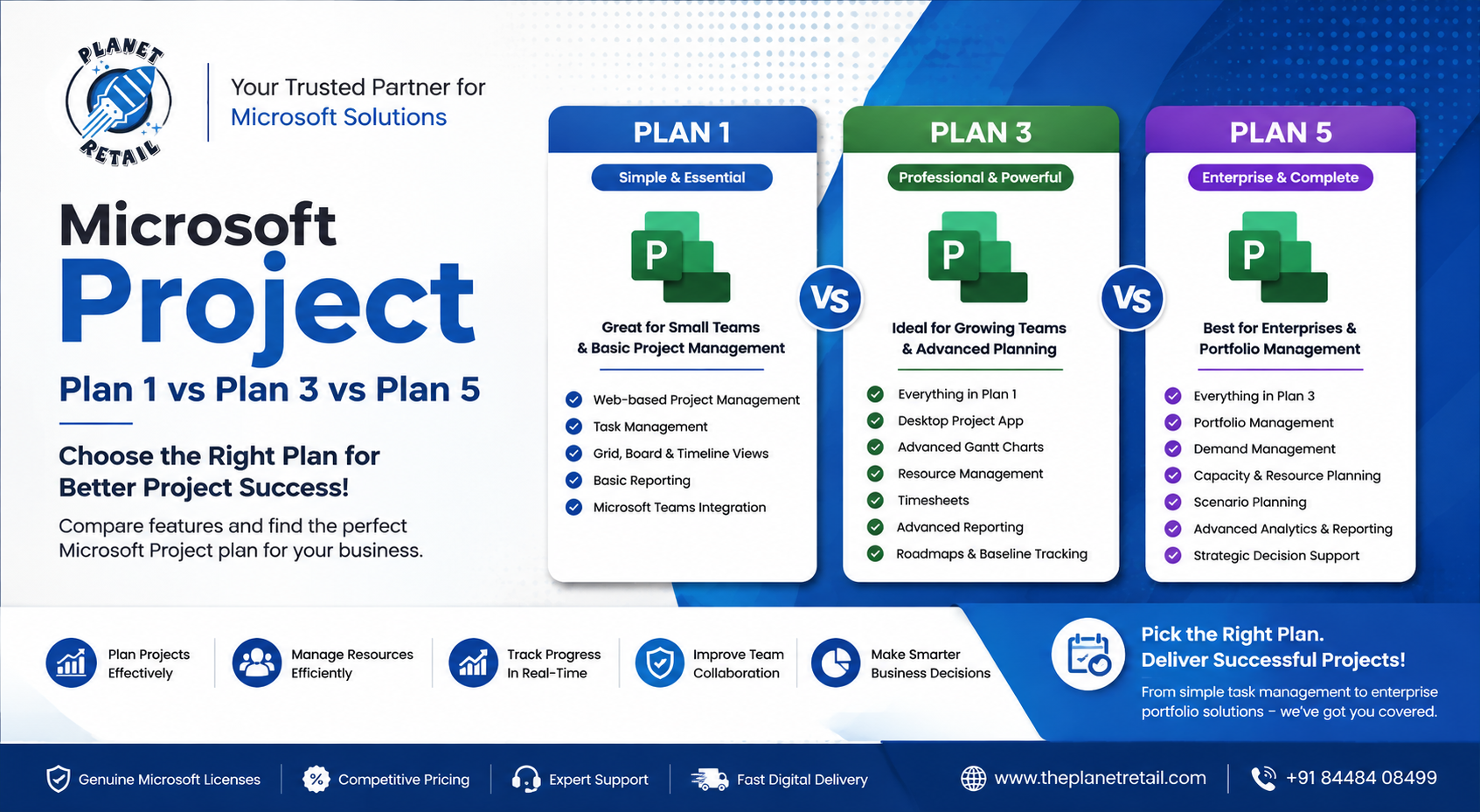
Microsoft Project Plan Comparison
| Feature | Project Plan 1 | Project Plan 3 | Project Plan 5 |
|---|---|---|---|
| Web-Based Project Management | ✅ | ✅ | ✅ |
| Project Scheduling | Basic | Advanced | Advanced |
| Gantt Charts | Basic | ✅ | ✅ |
| Grid, Board & Timeline Views | ✅ | ✅ | ✅ |
| Desktop Project App | ❌ | ✅ | ✅ |
| Resource Management | Limited | ✅ | Advanced |
| Portfolio Management | ❌ | ❌ | ✅ |
| Demand Management | ❌ | ❌ | ✅ |
| Scenario Planning | ❌ | ❌ | ✅ |
| Timesheets | ❌ | ✅ | ✅ |
| Advanced Reporting | Basic | Better | Enterprise |
| Power BI Integration | Limited | ✅ | ✅ |
| Roadmaps | Limited | ✅ | ✅ |
| AI-Assisted Scheduling* | Limited | Enhanced | Full Enterprise Features |
*Availability of AI-powered features depends on your Microsoft 365 environment and licensing.
Microsoft Project Plan 1
Best For:
- Small businesses
- Startups
- Individual project managers
- Freelancers
- Small internal teams
Project Plan 1 is Microsoft’s entry-level cloud project management solution.
It provides an easy way to:
- Create projects
- Track tasks
- Assign work
- Monitor progress
- Collaborate online
Everything works directly from your web browser without installing desktop software.
Key Features
- Task management
- Kanban boards
- Grid view
- Timeline view
- Team collaboration
- Basic reporting
- Microsoft Teams integration
Advantages
- Affordable
- Easy to learn
- Cloud-based
- Perfect for simple projects
Limitations
- No desktop Project application
- Limited resource management
- No portfolio management
- Basic scheduling tools
Microsoft Project Plan 3
Best For:
- Growing businesses
- IT companies
- Construction firms
- Engineering companies
- Medium-sized organizations
Project Plan 3 adds professional project planning capabilities that many organizations require.
In addition to web features, users receive the full Microsoft Project desktop application.
Key Features
- Everything in Plan 1
- Microsoft Project desktop app
- Advanced Gantt charts
- Critical path analysis
- Resource management
- Baseline tracking
- Timesheets
- Detailed scheduling
- Advanced reporting
Advantages
- Professional scheduling
- Better project visibility
- Desktop and web access
- Improved resource planning
Plan 3 is the most popular choice for organizations managing multiple projects simultaneously.
Microsoft Project Plan 5
Best For:
- Large enterprises
- PMOs (Project Management Offices)
- Government organizations
- Large consulting firms
- Multi-department businesses
Project Plan 5 includes every feature available in Microsoft Project.
It adds enterprise-grade portfolio management capabilities that help executives prioritize projects and optimize organizational investments.
Key Features
Everything included in Plan 3 plus:
- Portfolio optimization
- Demand management
- Enterprise resource planning
- Capacity planning
- Advanced analytics
- Strategic planning
- Scenario analysis
- Executive dashboards
- Organization-wide reporting
Advantages
- Enterprise scalability
- Strategic decision-making tools
- Complete project portfolio visibility
- Better executive reporting
Feature Breakdown
Scheduling
- Plan 1: Basic task scheduling
- Plan 3: Professional scheduling with dependencies and critical path
- Plan 5: Enterprise scheduling plus portfolio optimization
Resource Management
- Plan 1: Simple task assignment
- Plan 3: Resource allocation and workload balancing
- Plan 5: Enterprise-wide capacity planning
Reporting
- Plan 1: Basic dashboards
- Plan 3: Detailed project reports
- Plan 5: Executive portfolio dashboards and strategic insights
Collaboration
All three plans support:
- Microsoft Teams integration
- Shared projects
- Comments
- Online collaboration
- Cloud storage
- Microsoft 365 connectivity
Which Microsoft Project Plan Should You Choose?
Choose Project Plan 1 if you:
- Manage simple projects
- Need basic task tracking
- Have a small team
- Prefer a budget-friendly solution
Choose Project Plan 3 if you:
- Manage multiple projects
- Need Gantt charts
- Require the desktop Project application
- Need resource management
- Want professional scheduling tools
For most small and medium-sized businesses, Project Plan 3 offers the best balance of features and value.
Choose Project Plan 5 if you:
- Manage enterprise portfolios
- Need executive reporting
- Require portfolio optimization
- Oversee multiple departments
- Need advanced resource planning
Benefits of Buying Genuine Microsoft Project Licenses
Purchasing authentic Microsoft licenses ensures:
- Genuine Microsoft software
- Automatic updates
- Security improvements
- Reliable cloud services
- Microsoft technical support
- Licensing compliance
- Better business productivity
Why Buy Microsoft Project from The Planet Retail?
The Planet Retail is a trusted Microsoft solutions provider helping businesses choose the right Microsoft licensing based on their operational needs.
Benefits include:
- Genuine Microsoft Licenses
- Competitive Pricing
- Expert Licensing Consultation
- Fast Digital Delivery
- Dedicated Customer Support
- Assistance with Microsoft 365 Integration
- Business & Enterprise Licensing Solutions
Whether you’re a startup looking for simple project tracking or a large enterprise managing complex portfolios, The Planet Retail can help you select the right Microsoft Project plan for your business.
Final Thoughts
Choosing the right Microsoft Project plan depends on the size of your organization, the complexity of your projects, and your long-term business goals.
- Project Plan 1 is ideal for individuals and small teams.
- Project Plan 3 delivers professional project management capabilities for growing businesses.
- Project Plan 5 provides enterprise-grade portfolio and resource management for large organizations.
By understanding the differences, you can invest in a solution that improves collaboration, enhances productivity, and ensures successful project delivery.