- 8920675323
- 9971118455
- Uttar Pradesh, India

CSP vs OEM vs Retail Microsoft Licensing: Which License Is Right for Your Business?

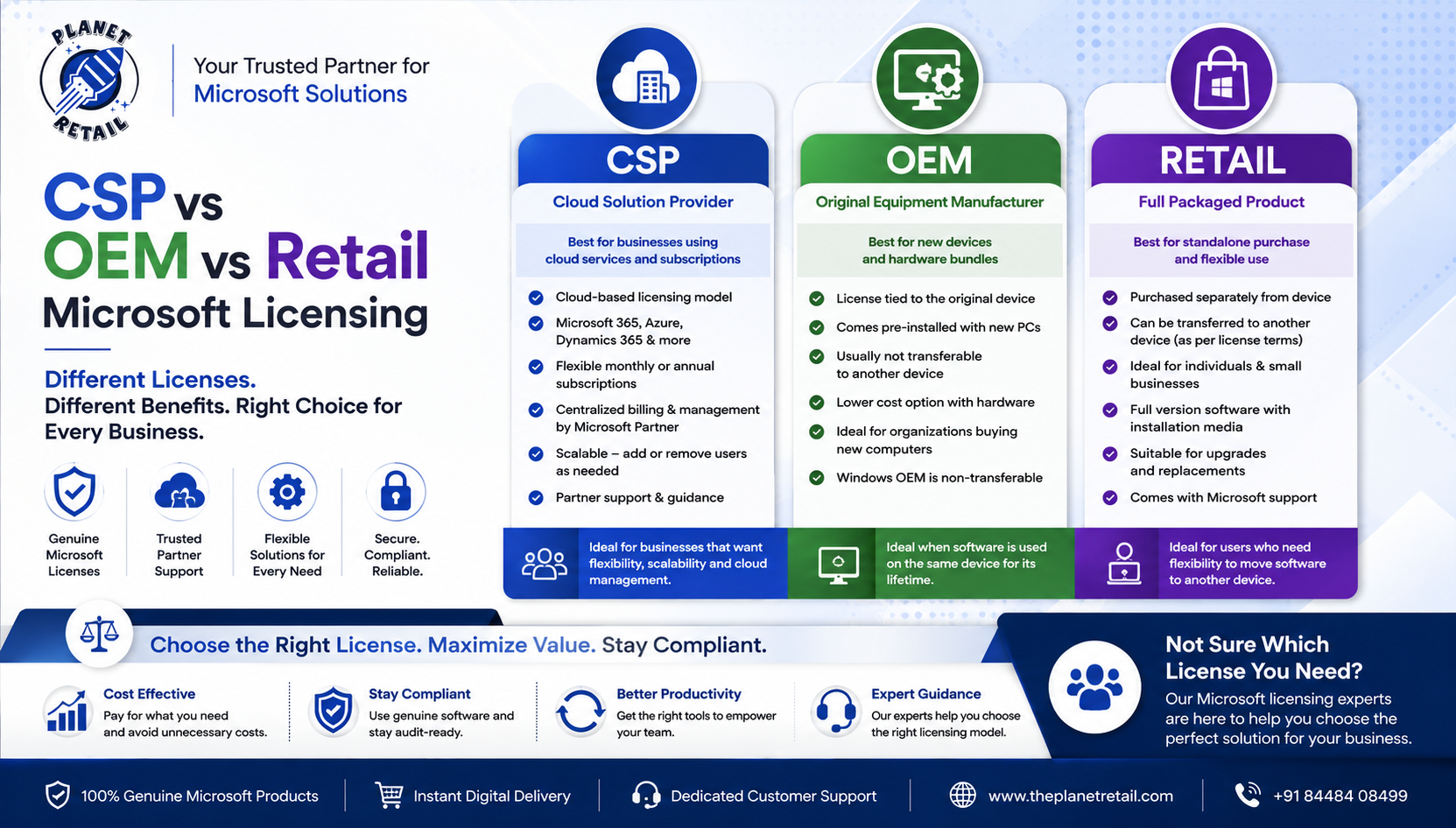
Choosing the right Microsoft license can be confusing. Businesses often come across terms such as CSP, OEM, Retail, ESD, and Volume Licensing, but these licensing models serve very different purposes.
Selecting the wrong license can create problems with device transfers, subscription management, compliance, upgrades, and long-term IT planning.
In this guide, we explain the differences between Microsoft CSP vs OEM vs Retail licensing, where each model fits best, and what businesses should consider before purchasing Microsoft software.
Important: CSP, OEM, and Retail are not simply three different “versions” of Microsoft software. They describe different licensing and distribution models, and the exact rights depend on the Microsoft product and license terms.
What Are Microsoft CSP, OEM and Retail Licenses?
At a high level:
- CSP (Cloud Solution Provider) — primarily a Microsoft partner-led channel for cloud subscriptions and certain software offers, with billing, provisioning, and support handled through the partner ecosystem.
- OEM (Original Equipment Manufacturer) — typically associated with software licensed with a specific device, particularly Windows, and generally tied to that hardware.
- Retail — software purchased as a standalone consumer/commercial product through retail channels, with transfer rights determined by the applicable Microsoft license terms.
Microsoft’s CSP program allows partners to sell a broad range of Microsoft products and services, including online services, software subscriptions, and certain perpetual software.
CSP vs OEM vs Retail: Quick Comparison
| Feature | CSP | OEM | Retail |
|---|---|---|---|
| Typical model | Partner-managed licensing | Device-associated license | Standalone purchase |
| Common use | Microsoft 365, Azure, business software | Windows with new PCs | Standalone Windows/software |
| Subscription support | ✅ Yes | Usually no | Usually no |
| Cloud services | ✅ Strong fit | ❌ | ❌ |
| Tied to original hardware | Depends on product | Generally yes | Generally no |
| Transfer to another PC | Depends on license | Generally not permitted | Often permitted under applicable terms |
| Centralized business management | ✅ | Limited | Limited |
| Partner billing/support | ✅ | Usually through OEM/reseller | Retail/reseller support |
| Best for | Businesses & cloud users | New-device purchases | Individual/standalone purchases |
The exact rights always depend on the specific Microsoft product and license agreement.
1. What Is Microsoft CSP Licensing?
CSP stands for Cloud Solution Provider.
The CSP model is designed primarily around Microsoft’s cloud and partner ecosystem. A CSP partner can manage the customer’s Microsoft subscriptions, billing, provisioning, and related services.
Microsoft describes CSP as a channel through which partners can sell Microsoft cloud services and other eligible offers. CSP partners can also provide technical and billing support and act as a customer’s primary point of contact.
Common CSP Products
Depending on current availability and licensing eligibility, CSP can include:
- Microsoft 365
- Office 365
- Azure
- Dynamics 365
- Security solutions
- Enterprise subscriptions
- Selected perpetual software
Microsoft’s CSP catalog changes over time, so businesses should verify the current offer and terms before purchasing.
Advantages of CSP
Centralized management
Organizations can manage Microsoft subscriptions through a business relationship with their CSP partner.
Flexible licensing
Businesses can add or modify eligible subscriptions according to their requirements.
Partner support
A CSP partner can assist with billing, deployment, configuration, and technical issues.
Cloud-first approach
CSP is particularly useful for organizations adopting Microsoft 365, Azure, Dynamics, and other cloud services.
2. What Is an OEM Microsoft License?
OEM stands for Original Equipment Manufacturer.
OEM licensing is commonly associated with Windows software supplied with a new computer.
For example, a new laptop may come with Windows 11 Pro OEM already installed and activated.
The major characteristic is that the license is associated with the original device.
Microsoft community guidance consistently describes OEM Windows licenses as being tied to the original hardware and not transferable to another computer.
Advantages of OEM Licensing
- Usually supplied with new PCs
- Convenient activation
- Suitable for organizations purchasing computers with Windows
- Typically lower-cost than purchasing a separate transferable license
- Ideal when the software will remain with the device
OEM Limitation
The biggest consideration is transferability.
If you replace a computer, an OEM Windows license generally cannot simply be moved to the new PC.
Therefore, businesses replacing hardware frequently should consider their licensing strategy carefully.
3. What Is a Retail Microsoft License?
A Retail license is generally purchased separately from the computer rather than being permanently associated with the original hardware.
For applicable standalone Microsoft software, retail licensing can provide greater flexibility when replacing hardware.
Microsoft licensing guidance for standalone software indicates that transfer to another device may be allowed, subject to the applicable license terms, provided the software is removed from the previous device and the licensing conditions are followed.
Advantages of Retail Licensing
- Standalone purchase
- Greater hardware flexibility for eligible products
- Useful when upgrading computers
- Suitable for individual users and small businesses
- No requirement to purchase a new PC with the software
Important
“Retail” does not automatically mean every Microsoft product can be transferred freely.
Always check the specific product’s license terms before moving it to another device.
CSP vs OEM vs Retail: Which One Should You Choose?
The answer depends largely on how your organization uses Microsoft software.
Choose CSP If You:
- Use Microsoft 365
- Need cloud-based services
- Want centralized subscription management
- Need Microsoft Azure
- Want partner-assisted billing and support
- Have multiple users
- Need flexible business licensing
For growing businesses moving toward cloud-based IT infrastructure, CSP can be an excellent choice.
Choose OEM If You:
- Are purchasing new computers
- Want Windows preinstalled
- Plan to keep the license with the original device
- Don’t expect to transfer Windows to another PC
OEM is particularly convenient when purchasing new laptops or desktops with Windows already included.
Choose Retail If You:
- Want to purchase software separately
- Need greater flexibility for eligible licenses
- Frequently replace or upgrade hardware
- Need a standalone software license
- Have one or a small number of PCs
Retail can be attractive for users who value portability of an eligible standalone license.
CSP vs OEM vs Retail for Businesses
For businesses, the decision becomes more strategic.
Small Business
A small business with a few computers may use:
OEM + Retail + CSP
For example:
- OEM Windows on new laptops
- Retail licenses where transferability is important
- Microsoft 365 through CSP
Medium-Sized Business
A growing organization may benefit from:
CSP + appropriate perpetual licenses
CSP can simplify management of Microsoft 365 and other cloud services while standalone licenses can cover specific desktop software requirements.
Enterprise
Large organizations often require a broader licensing strategy involving:
- CSP
- Enterprise agreements
- Volume licensing programs
- Microsoft 365
- Azure
- Security solutions
- Perpetual software
The correct model depends on the organization’s users, devices, applications, cloud strategy, and contractual requirements.
One of the Biggest Differences: Hardware Transferability
This is one of the most important issues when comparing OEM and Retail.
OEM
PC → License stays with PC
If you replace the computer, you generally need another license.
Retail
PC → License may be transferred
For eligible standalone software, the applicable Microsoft terms may allow the license to move to another device, provided the previous installation is removed and other conditions are met.
CSP
CSP is fundamentally different because it is a partner/channel model, particularly for cloud services. It isn’t simply a “transferable key” category like the common OEM-versus-Retail comparison.
Subscription vs One-Time Licensing
Another important distinction is the difference between subscription and perpetual licensing.
CSP Subscription
You typically pay according to the subscription and term you select.
This can provide:
- Current cloud services
- Flexible user management
- Ongoing service access
- Partner support
- Easier scaling
Retail/OEM Perpetual Software
For applicable perpetual products, you make a one-time purchase for the licensed version.
This can be attractive when:
- You don’t need ongoing cloud services
- You want predictable upfront costs
- You need a specific desktop software version
- You don’t want a recurring subscription for that product
Which Microsoft Licensing Model Is More Cost-Effective?
There is no universal answer.
The cheapest license today may not be the cheapest option over several years.
Consider:
Purchase price + subscription cost + hardware changes + support + management + compliance
For example, a business that replaces computers frequently may value the flexibility of an eligible transferable retail license.
On the other hand, a business that needs Microsoft 365, centralized administration, cloud storage, Teams, and ongoing services may find CSP more appropriate.
Why Genuine Microsoft Licensing Matters
Regardless of the licensing channel you choose, purchasing from a legitimate source is critical.
Unauthorized or incorrectly licensed software can create:
- Compliance problems
- Activation issues
- Security risks
- Unexpected downtime
- Difficulties during audits
- Lack of reliable support
Microsoft’s CSP ecosystem, for example, includes defined partner requirements, agreements, offers, and pricing structures.
Why Choose The Planet Retail?
The Planet Retail offers Microsoft Windows, Microsoft 365, Office, Windows Server, Project, Visio, and other software solutions.
The company’s website identifies it as an Authorized Microsoft Partner and highlights genuine Microsoft software, online software delivery, and customer support.
The Planet Retail can help businesses understand their licensing requirements and select an appropriate Microsoft solution based on:
- Number of users
- Number of devices
- Business size
- Software requirements
- Cloud requirements
- Hardware replacement plans
- Budget
- Licensing objectives
Rather than simply choosing the cheapest key, businesses should choose the license model that matches their actual requirements.
Frequently Asked Questions
Is CSP better than Retail?
Not necessarily. They serve different purposes.
CSP is particularly suited to Microsoft cloud services and partner-managed business licensing, while Retail is a standalone software purchasing channel for applicable products.
Is OEM cheaper than Retail?
OEM licensing can be more economical when Windows is supplied with a new computer, but the license generally remains associated with that device.
Retail may offer greater flexibility for eligible licenses.
Can an OEM license be transferred to another PC?
For Windows OEM licensing, the license is generally tied to the original device and is not transferable to another computer.
Can a Retail Microsoft license be transferred?
For eligible standalone Microsoft software, transfer may be permitted under the applicable license terms. The previous installation generally must be removed before transferring the license.
Is CSP only for Microsoft 365?
No. Microsoft says CSP partners can offer a range of Microsoft products and services, including online services, subscriptions, Azure-related offerings, and certain perpetual software. The available catalog changes over time.
Final Verdict: CSP vs OEM vs Retail
There isn’t one Microsoft licensing model that is best for everyone.
Choose OEM when Windows comes with a new computer and you intend to keep the license with that device.
Choose Retail when you need an eligible standalone Microsoft license and value greater flexibility around device replacement.
Choose CSP when your organization needs Microsoft cloud services, subscriptions, centralized management, and partner-assisted licensing.
The simple rule:
New PC → OEM
Standalone eligible software → Retail
Microsoft cloud & business subscriptions → CSP
For businesses with more complex requirements, combining different licensing models can be the most practical solution.
The key is not simply finding the cheapest Microsoft license—it is choosing the right license with the right rights for your business.